This week, I dug into Nuke’s autolabel process, and now I have it providing useful labels on Shuffle2 nodes. That’s the new Shuffle, the one where we connect lines between in and out to make connection. The autolabel can help us understand simple shuffles like this one without even opening the control panel:

For complicated shuffles, we don’t even try to bake them down into an instantly-understandable label, but we do give an indication of what kind of complication is present, so we know to open the control panel and see… whatever craziness is going on in here:

Seriously, please don’t comp like this.
In the process of making this autolabel, I was reminded of a few things that make them more complicated in Nuke than we would expect. Here’s a list of the gotchas.
We are responsible for all of the node’s labelling.
Nuke uses the autolabel process to make all of the text and icons on a node. Placing an autolabel on a node completely replaces Nuke’s default one. That means we are now responsible for putting the name on the node, and adding any label text the user has written.
Node icons come from autolabel, too.
Node icons are those little graphics we’ve all seen so often that we don’t even think about them anymore. They’re the channel indicator rectangles in the lower-left corner and the C or E in a circle that alerts us to cloned nodes or expression-driven knobs.
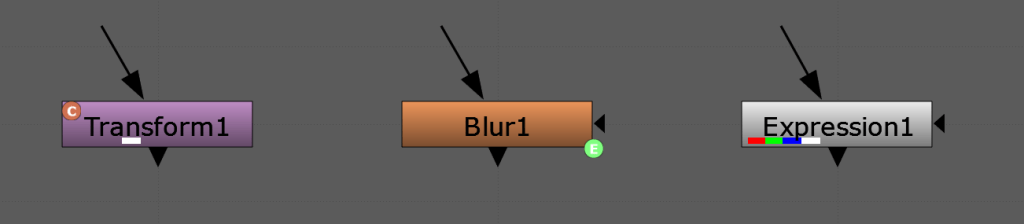
Use Nuke’s default autolabel as a reference.
Nuke creates the default node autolabel for every node from a single Python script. It’s called autolabel.py and it lives inside the plugins folder in our Nuke install folder. Do not edit this file! But do refer to it when making a custom autolabel. Our code will need to replicate the functionality of this script.
It is relatively straightforward to handle the Node name and any label text ourselves. But if we need a reminder, find this part of autolabel.py by searching for: “# do stuff that works even if autolabel is turned off:“. Then, go down to “# build the autolabel:” to see how to assemble the autolabel.
One part that is both important and easy to overlook is the node icons. To see how Foundry is handling them, search for “# do the icons:“. Instead of trying to replicate this myself, I copied this whole section into my code.
Foundry’s documentation on autolabel.py is meh.
Here it is. See? I told you so.
This post on the Community site is a good kick-start: https://community.foundry.com/discuss/topic/144994/autolabel-knob-and-indicators-labels-and-all-that-jazz
With a bit of searching, you’ll also find some other writers’ blog posts about it as well.
Good luck.
I believe customizing Nuke to work the way you want to work is a comping superpower. Having less to hold in our heads while working helps us make better, more situationally appropriate decisions. But with great power comes great responsibility. Make it easy to disable your code if you discover it’s creating a problem you didn’t anticipate. And go crush some comps.
Thanks go to Eva Mateo, indoorjetpacks, Kyle Rottman, and Erwan Leroy on the VFXTalk Discord for being my copilots on this project. If you’re into VFX — whether as a pro, a student, a teacher, or an aficionado — come join us on the server!
